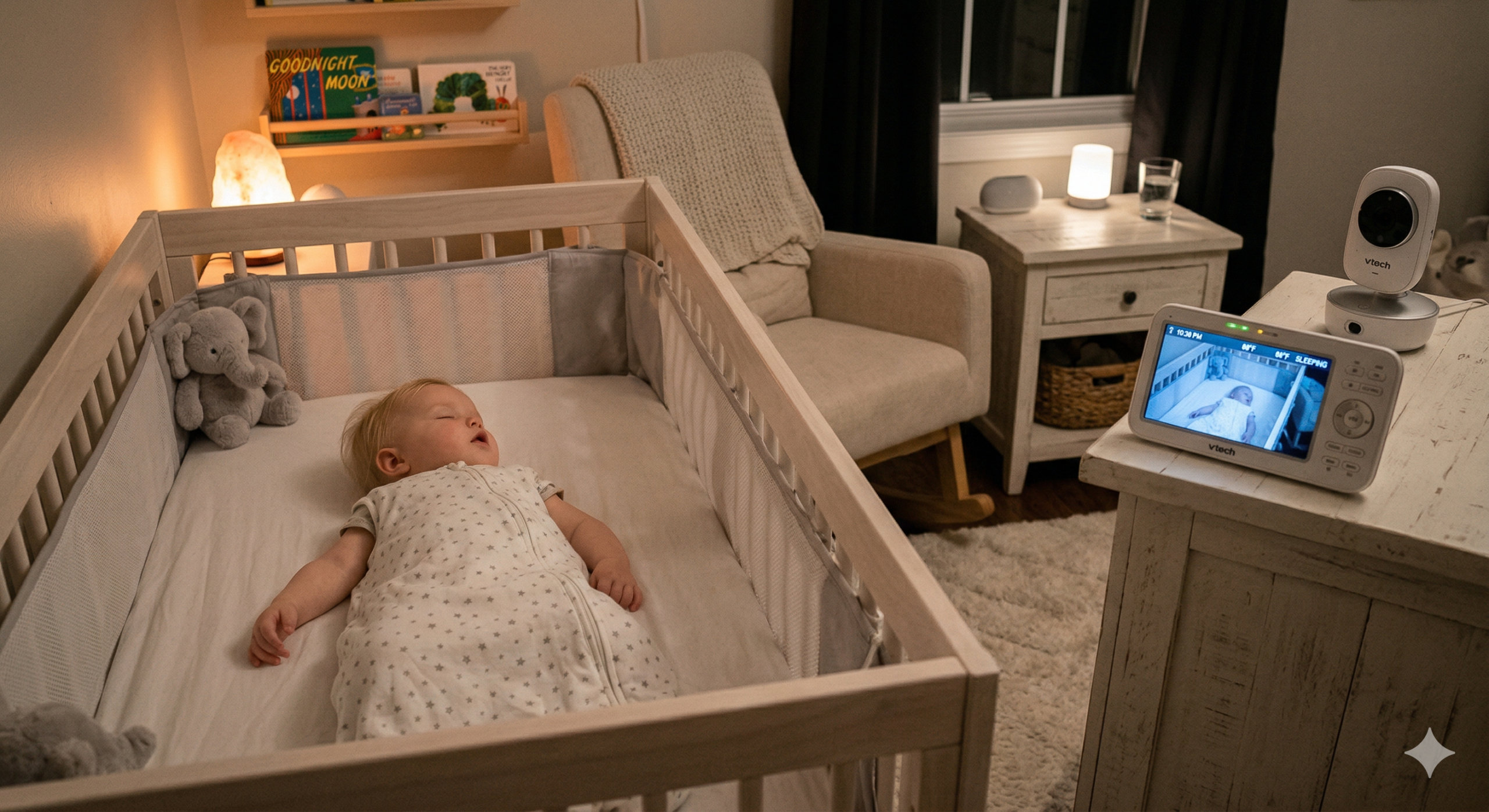
Choosing the best baby monitor in 2026 can feel completely overwhelming. AI sleep tracking, breathing detection, cry analysis, 2K video, encrypted feeds — the options are staggering. Some monitors cost $25. Others cost $500. And somehow, you are supposed to just *know* which one your family needs.
Take a breath. You do not need the fanciest baby monitor on the market. You need the right one for your home.
I put together this buying guide to cut through the noise with just the honest information you need to pick a baby monitor with confidence, whether you are a first-time parent or adding to a growing crew.
A good sound machine paired with a monitor makes a big difference.
If you’re also looking for a bottle sterilizer for your daily needs, check out our best bottle sterilizer picks for 2026!
Let’s walk through everything step by step.
- Quick Picks: Best Baby Monitors at a Glance
- Types of Baby Monitors Explained
- What to Look for in a Baby Monitor: Features That Actually Matter
- WiFi vs Non-WiFi: The Biggest Decision You Will Make
- How to Choose the Right Baby Monitor for Your Home
- Our Top Baby Monitor Picks for 2026
- Comparing the models…
- Wrapping Up: Trust Yourself
- Common Baby Monitor Mistakes to Avoid
- Frequently Asked Questions
Quick Picks: Best Baby Monitors at a Glance
Here are our top recommendations by category. Full details on each one below.
Best Overall Infant Optics DXR-8 Pro | Price: $170 – $200
Best Smart Monitor Nanit Pro Camera | Price: $200 – $300
Best for Health Monitoring Owlet Dream Duo 2 | Price: $200 – $300
Best Budget Video HelloBaby HB6550 | Price: $50 – $70
Best Budget Audio VTech DM111 | Price: $25 – $35
Best for Privacy Babysense Prisma | Price: $50 – $100
Best AI Features CuboAi Smart 3 | Price: $200 – $300
Types of Baby Monitors Explained
Before looking at features and specific picks, it helps to understand the main categories. Here is a plain-English breakdown of each type and who it is best for.
Audio-Only Monitors
The simplest option. A transmitter in the nursery picks up sound and sends it to a portable parent unit. That is it.
Best for: Parents who want a basic, affordable alert system. Also great as a backup monitor or for travel.
Trade off: No visual. You hear your baby cry but cannot see what is happening. Most new parents find this stressful, especially in the early months when every sleep grunt sounds like it could be something more.
If you’re travelling and sharing a hotel room, an audio only monitor helps — especially paired with the other baby travel essentials we recommend for your first flight.
Video Monitors (Non wifi)
These include a camera in the nursery and a dedicated handheld screen (usually 3.5 to 5 inches). They use a closed radio frequency signal — no internet connection needed.
Best for: Parents who want to see their baby without putting a WiFi-connected device in the nursery. This is the sweet spot for a lot of families.
Trade off: You can only view the feed on the included parent unit, not on your phone. Range is limited (typically 600 to 1,000 feet), though for most homes that is more than enough.
WiFi Smart Monitors
These connect to your home WiFi and stream video to an app on your phone or tablet. Many include smart features like sleep analytics, cry detection, temperature alerts, and cloud recording.
Best for: Tech-savvy parents who want remote access, smart features, and the flexibility of viewing from any device, anywhere.
Trade off: Dependent on your WiFi reliability. Some real security and privacy considerations. And some require monthly subscriptions for full features, which adds up over time.
Wearable Monitors
Small devices (usually a sock, band, or clip) that attach to your baby and track vital signs like heart rate, oxygen levels, and skin temperature.
Best for: Parents with specific health concerns, premature babies, or those who want an extra layer of reassurance beyond video and audio.
Trade off: Can trigger false alarms, which increases your anxiety rather than reducing it. The American Academy of Pediatrics (AAP)</a> advises caution, noting that consumer-grade wearables are not medical devices (with the exception of FDA-cleared products like the Owlet Dream Sock).
Hybrid Camera + Wearable Systems
The newest category. These bundle a nursery camera with a wearable sensor, giving you video monitoring plus vitals tracking in one system.
Best for: Parents who want the most comprehensive monitoring available. Particularly popular with first-time parents.
Trade off: The most expensive option. More devices to charge and manage. And worth considering honestly: will having more data make you feel calmer, or give you more things to worry about?
What to Look for in a Baby Monitor: Features That Actually Matter
Not every feature marketed to you is worth paying for. Here is an honest breakdown of what matters, what is nice to have, and what is mostly marketing.
Must-Have Features
Video quality (720p minimum, 1080p recommended)
You need to clearly see your baby, especially at night. Anything below 720p will look grainy and frustrating. In 2026, 1080p is the sweet spot — sharp enough to see details without requiring massive bandwidth.
Night vision
Your baby sleeps in a dark room. Infrared night vision is essential, not optional. Every decent monitor includes this, but quality varies hugely. Cheap night vision gives you a washed-out grey image. Good night vision lets you clearly see your baby’s face, their position, and their movements. Always check night vision samples in reviews before buying.
Two-way audio
Being able to talk to your baby (or sing, or shush) through the monitor is genuinely useful. It can soothe a fussy baby without you having to walk to the nursery, buying you a few extra minutes of rest. On the nights it works, it feels like a superpower.
Room temperature monitoring
Overheating is a known risk factor for SIDS, and newborns cannot regulate their body temperature well. A built-in temperature sensor lets you check the nursery conditions at a glance. The NHS recommends keeping the nursery between 16°C and 20°C (61°F to 68°F).
Reliable range or connection
For non-WiFi monitors, you need enough range to cover your home. For WiFi monitors, you need a stable connection. A monitor that drops signal every time you walk to the kitchen is worse than useless.
Nice to Have Features
Pan, tilt, and zoom
Being able to remotely adjust the camera angle is convenient, especially as your baby starts moving around the crib. Not essential for a newborn, but increasingly useful from about four months onward.
Lullabies and white noise
Some monitors include built-in sounds. A nice bonus, but a separate white noise machine will usually sound better and give you more flexibility.
Multi-camera support
If you have more than one child or want cameras in multiple rooms, check that the monitor supports additional cameras. Some systems allow split-screen viewing.
Sleep tracking and analytics
Smart monitors like the Nanit Pro track your baby’s sleep patterns, movement, and room conditions over time. This data can be genuinely helpful for establishing routines. But it is a nice-to-have, not a necessity.
Smartphone-only viewing (no parent unit)
This sounds convenient, but relying solely on your phone means you cannot check the monitor while your phone is charging, in use, or in another room. A dedicated parent unit is more reliable for overnight monitoring.
Features That Sound Better Than They Are
Cry analysis and translation
Some monitors claim to tell you why your baby is crying (hungry, tired, uncomfortable). In practice, the accuracy is inconsistent, and most parents learn to read their baby’s cries faster than any algorithm. Take these claims with a healthy pinch of skepticism.
4K or 2.5K video resolution
Overkill for a baby monitor. You are monitoring a sleeping baby in a dark room, not filming a documentary. 1080p is more than enough.
WiFi vs Non-WiFi: The Biggest Decision You Will Make
This is the single most important choice in 2026, and it deserves its own section. Get this right and everything else falls into place.
| The case for wifi monitors View from anywhere Smart features: sleep tracking, AI alerts etc No range limits: As long as you have internet Easy sharing: family members can access |
| The case for non wifi monitors Cannot be hacked No internet dependency No subscriptions Simpler setup: plug in and go, no download Zero data collection |
How to Choose the Right Baby Monitor for Your Home
Before we get into specific product picks, let’s figure out what you actually need. Walk through these five questions and you will have a clear picture of your ideal monitor.
1. How Big Is Your Home?
If you live in a small flat, almost any monitor will work. Range is not a concern. A simple non-WiFi monitor will do the job beautifully.
If you are also shopping for a stroller, our stroller buying guide walks through a similar decision process and if you are looking for our recommended strollers, check this out!
If your home has multiple floors or a larger layout, things get more interesting. Non-WiFi monitors are rated for up to 1,000 feet in open air, but walls, floors, and appliances cut that range significantly. In a bigger home, a WiFi monitor often makes more practical sense — as long as you have decent WiFi coverage throughout the house.
2. How Important Is Privacy to You?
If the idea of a camera streaming footage through a company’s cloud servers makes you uncomfortable, go non-WiFi without hesitation. The Infant Optics DXR-8 Pro and Babysense Prisma both deliver excellent video on a completely closed signal. Nobody sees that feed except you.
If you are somewhere in the middle, most modern WiFi monitors offer solid security — end-to-end encryption, two-factor authentication, and clear privacy policies. The risk is real but manageable with basic precautions.
And if privacy is not a major concern, WiFi smart monitors offer genuinely useful features that non-WiFi monitors simply cannot match.
3. Do You Have Specific Health Concerns?
For the vast majority of healthy, full-term babies, a standard video monitor is more than sufficient. The AAP does not recommend routine oxygen or heart rate monitoring for healthy infants, and consumer-grade wearables can actually increase anxiety through false alarms.
However, if your baby was born prematurely, has a diagnosed condition, or your pediatrician has specifically recommended vitals monitoring, an FDA-cleared device like the Owlet Dream Sock can provide meaningful data. The key word is FDA-cleared — not all wearable monitors have that distinction, and it matters.
Always have this conversation with your doctor rather than making the decision based on marketing alone.
4. What Is Your Budget?
Your budget matters, and here is the honest truth: you do not need to spend a fortune to get a good baby monitor. Here is roughly what to expect.
Under $75: You can get a perfectly good audio monitor for around $30, or a solid video monitor for $50 to $70. These are not compromise choices — they genuinely do the core job well.
$150–$200: This is the sweet spot for most families. Excellent non-WiFi video monitors with remote pan and tilt, multi-camera support, and strong build quality.
$300–$500: Smart WiFi monitors with sleep analytics, AI-powered alerts, or health monitoring. Impressive technology, but be honest about what you will actually use at 3am on four hours of sleep.
5. Do You Want Smart Features?
If your answer is “no, just show me my baby” — non-WiFi video monitors are your lane. Simple, reliable, no subscriptions. You plug it in and it works. For years.
If your answer is “yes, I want data and tracking” — WiFi smart monitors offer sleep tracking, breathing motion detection, AI alerts, and shareable access. Just be prepared for subscriptions (typically $100/year for full features) and WiFi dependency.
There is no wrong answer. But knowing where you stand before scrolling through product pages will save you hours of indecision.
Our Top Baby Monitor Picks for 2026
Now that you know what to look for, here are the specific monitors we recommend. These are based on extensive research across expert reviews, real parent feedback, and current testing data.
Best Overall: Infant Optics DXR-8 Pro
Price: $170 – $200 | Type: Non-wifi video
The Infant Optics DXR-8 Pro has dominated best-seller lists for years, and it is not because of flashy marketing. It is because parents keep recommending it to other parents. That kind of word-of-mouth loyalty tells you something no spec sheet can.
What makes it special is how well it does the basics. The 5-inch display is large enough to see clearly from your nightstand. The 720p resolution is not the sharpest number on paper, but in practice the image is clear and detailed, day or night. The infrared night vision is excellent — bright, high-contrast, even in a pitch-dark nursery.
The interchangeable optical lens system is a feature unique to Infant Optics. The camera ships with a standard lens and a wide-angle lens, and you can physically swap them depending on your nursery layout. Close crib? Pop on the wide-angle for a full room view. Further away? The standard lens gives a tighter, more detailed shot. Simple, clever solution.
Because it uses a closed FHSS radio frequency, there is zero internet involvement. No WiFi, no app, no cloud, no subscription, and no possibility of anyone else accessing your feed. The parent unit battery lasts up to 12 hours in power-saving mode — a full night without charging (it can last 6 hours with the screen on). An optional external battery pack ($20, sold separately) is also available if needed. Range covers 1,000 feet and holds steady through walls and floors in a typical home.
Where it falls short is where you would expect: no sleep tracking, no app, no smart features. The 720p trails behind 1080p WiFi competitors. The parent unit screen is not the brightest.
But most parents who buy this never think about those trade-offs. They are too busy appreciating a monitor that just works — reliably, privately, every single night.
Best for: Parents who want a dependable, hassle-free monitor. If you do not care about sleep analytics or remote phone viewing, this is the one.
Best Smart Monitor: Nanit Pro Camera
Price: $200 – $300 | Type: Wifi smart
The Nanit Pro is not just a camera with an app — it is a sleep monitoring platform that happens to include a camera.
The setup is unique. The Nanit mounts overhead, looking straight down at your baby from above the crib. This bird’s-eye perspective powers its computer vision technology, which tracks breathing motion, sleep patterns, and movement without any wearable touching your baby.
The 1080p video is crisp day and night. The app streams reliably in the background, so you hear your baby even while using other apps. Two-way audio, temperature and humidity sensors, and built-in nature sounds round out the package.
The real draw is Nanit Insights, the sleep analytics platform. Over days and weeks, it builds a detailed picture of your baby’s sleep — when they fall asleep, how long they sleep, how many wake-ups, and how room conditions affect their rest. For parents who are sleep training or trying to establish a routine, this data can be genuinely useful. Instead of guessing whether last night was better, you have actual numbers. That helps you make decisions about bedtime, room temperature, and routines with more confidence.
The catch? Full analytics require a subscription: $100 per year or $200 for a lifetime plan. Without it, you still get a good camera with basic tracking, but the detailed insights that make Nanit special are locked behind the paywall. The wall mount requires drilling. And because everything runs through WiFi, your feed is only as reliable as your internet connection.
Best for: Data-driven parents who want to understand their baby’s sleep at a deeper level. If you just want to see your baby, the Infant Optics does that at half the price.
Best for Health Monitoring: Owlet Dream Duo 2
Price: $200 – $300 | Type: Wifi camera + wearable
The Owlet Dream Duo 2 pairs a 1080p HD nursery camera with the Owlet Dream Sock — a soft fabric sock that wraps around your baby’s foot and continuously tracks heart rate and blood oxygen levels using pulse oximetry. The sock is FDA-cleared for over-the-counter pulse oximetry. This is not a vague wellness estimate. It is the same technology hospitals use, adapted for home use and independently validated.
The experience is straightforward. You glance at the base station and see a green indicator — heart rate normal, oxygen normal. If readings drop outside preset ranges, the base station sounds an alarm. For parents of premature babies, or babies with respiratory or cardiac concerns, this layer of objective data can make the difference between constant worry and actual rest.
The camera does everything you would expect: clear 1080p video, reliable night vision, two-way audio, room temperature monitoring. The sock is comfortable enough that most babies wear it without fuss.
The limitations are real, though. The sock needs charging roughly every 16 hours, and recharging takes about 90 minutes, so you are building a daily charging routine (the camera plugs into the wall, so no battery required). It only fits babies up to about 18 months or 25 lbs. And false alarms do happen — a shifting sock or slightly loose fit can trigger an alert. Some parents find the occasional false alarm worth it for ongoing reassurance. Others find it makes things worse.
This is also the most expensive option on this list. Whether it is worthwhile depends heavily on your specific situation.
Best for: Parents of premature babies or babies with diagnosed health conditions. Talk to your paediatrician first. If your doctor recommends home vitals monitoring, this is the most credible consumer option. For healthy, full-term babies, a standard video monitor is typically all you need.
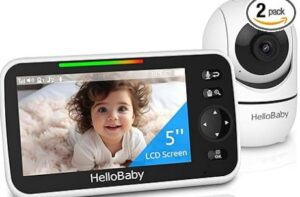
Best Budget Video Monitor: HelloBaby HB6550
Price: $50 – $70 | Type: Non-WiFi Video
The HelloBaby HB6550 costs less than a decent dinner out, and it does 90% of what a $350 baby monitor does. That is not an exaggeration.
The 5-inch colour LCD screen gives you a clear view of your baby’s crib, day and night. Night vision switches on automatically, and while the image is not as sharp as HD WiFi competitors, it is more than good enough to see whether your baby is asleep, awake, or has kicked off their blanket. You can see what you need to see. That is the job, and the HelloBaby does it.
Two-way audio lets you talk through the monitor. Room temperature is displayed on the parent unit. There are eight built-in lullabies, and a VOX mode that keeps the screen off until the baby makes noise — a genuine battery-saver overnight. The range covers 1,000 feet. No WiFi, no app, no subscription, no data collection. Setup takes five minutes.
Another strength of the HelloBaby HB6550 is the surprisingly strong battery for the price. The parent unit lasts around 11 to 12 hours with the screen on (the box claims 16, real-world testing says closer to 11.5). In VOX mode — where the screen stays off until baby makes noise — it stretches to 26 to 30 hours. That is comfortably two nights on a single charge.
Where you will notice the budget: the parent unit feels a bit plasticky. Pan and tilt are manual (you adjust the camera by hand). Video resolution is standard definition, not HD. On a 5-inch screen the difference is less noticeable than you might think, but it is there.
None of these trade-offs affect the monitor’s core ability to show you your baby safely and reliably.
Best for: Budget-conscious parents, second-monitor setups, or grandparents’ houses. Does everything you truly need and nothing you do not.
Best Budget Audio Monitor: VTech DM111
Price: $25 – $35 | Type: Non-WiFi Audio
Sometimes the simplest solution is the best one. The VTech DM111 is a no-frills audio monitor that is popular for a reason.
DECT 6.0 digital technology means the audio signal is clear, interference-free, and secure. Range stretches up to 1,000 feet. The parent unit has a belt clip so you can carry it around while doing chores, cooking, or folding the endless mountain of baby laundry.
One feature that is easy to overlook but genuinely useful: the LED sound level indicator lights on the parent unit. Even with the volume turned down low (or off entirely while your partner sleeps), you can see the lights flash when your baby makes noise. Simple visual alert that adds real flexibility overnight.
The talk-back intercom lets you respond through the monitor. The rechargeable battery means you are not constantly buying replacements. Do note that, you can go for about 8 hours on the rechargeable battery. Since it is audio-only, power draw is lower, but 8 hours still may not get you through a full night without plugging it in.
There is no video. There is no app. There are no smart features. And for many parents — especially those on their second or third child — that is perfectly fine. You know the sounds your baby makes. You know the difference between sleep grunts and genuine distress.
Best for: Parents who want a simple, reliable alert when their baby cries. Excellent as a travel monitor or backup to a video system. And spending $30 on a monitor means having $300 more for nappies.
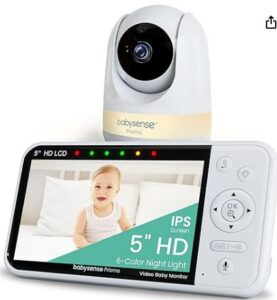
Best for Privacy: Babysense Prisma
Price: $50 – $100 | Type: Non-WiFi Video
If data privacy is a top priority, the Babysense Prisma is built specifically for parents who want zero internet connectivity in their nursery.
No WiFi, no app, no cloud storage, no account creation, and no data collection of any kind. The camera sends a closed-frequency signal to the included 5-inch parent unit, and that is where the feed stays. Nobody at Babysense is storing clips of your nursery. No hacker can access a camera that is not connected to the internet.
(If you would like to find out more about whether baby monitors can be hacked, check out our guide here).
What makes the Prisma worth its price is that it does not sacrifice capability to achieve that privacy. Remote pan, tilt, and zoom let you scan the nursery without walking in and disturbing a sleeping baby. The split-screen display supports up to four cameras simultaneously — genuinely useful if you have multiple children or want coverage in more than one room. The rechargeable battery lasts through the night. VOX and eco modes extend battery life further.
Room temperature monitoring, two-way audio, 1,000-foot range — all present.
Another winner for the Babysense Prisma is its battery life. The 4,000 mAh parent unit lasts about 12 hours with the screen on and up to 20 hours in eco mode. You can realistically get through two full nights in eco mode without charging. For a non-WiFi monitor with a dedicated screen, that is genuinely impressive.
The trade-offs are predictable: no sleep tracking, no analytics, no phone access, no remote viewing when you are away from home. The video resolution is good but not as sharp as the best WiFi cameras.
But if you want to check on your baby from the next room — which is what most parents actually do, most of the time — the Prisma does it beautifully, without a single byte of data leaving your home.
Best for: Privacy-conscious families who want a capable video monitor with absolutely zero internet involvement. Also great for multi-room monitoring with split-screen support.
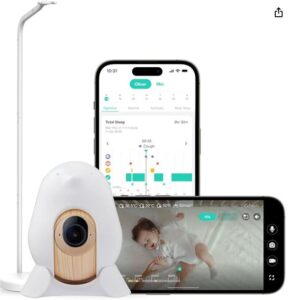
Best AI Features: CuboAi Smart 3
Price: $200 – $300 | Type: Wifi smart
Most baby monitors, even the smart ones, are essentially security cameras in cute housings. They show you what is happening, and it is up to you to spot problems. The CuboAi Smart 3 takes a different approach.
Its AI analyses the video feed in real time and alerts you to specific safety concerns: a blanket drifting over your baby’s face, your baby rolling into a flagged position, or your baby moving to the edge of the crib into a marked danger zone.
These are not gimmicks. Face-covering detection addresses a real concern. Instead of watching the monitor all night, you can trust that the AI will alert you if something needs attention. It does not replace safe sleep practices, but it adds a layer of active monitoring that no traditional camera offers.
The video quality backs up the smart features. At 2.5K QHD resolution, the CuboAi delivers the sharpest image on this list. Night vision is clear and detailed. The optional standalone parent unit gets an impressive 18 hours of battery life — the best in this roundup. Temperature and humidity sensors, sleep analytics, and automatic photo capture of key moments round out the package.
The downsides mirror other WiFi smart monitors. Premium AI features require a subscription at $100 per year. AI alerts can occasionally be triggered by shadows or shifting blankets. Setup is more involved than simpler monitors. And the entire system relies on a stable WiFi connection.
Best for: Parents who want their monitor to actively watch for safety concerns rather than just streaming video. Particularly useful once baby starts rolling and moving in the crib (around 4 to 6 months).
Comparing the models…
| Feature | Infant Optics DXR-8 | Nanit Pro | Owlet Dream Duo 2 | HelloBaby HB6550 | VTech DM111 | Babysense Prisma | CuboAi Smart 3 |
| Type | Non-wifi | Wifi | Wifi + wearable | Non-wifi | Non-wifi | Non-wifi | Wifi |
| Video | 720p HD | 1080p HD | 1080p HD | SD | Audio only | HD | 2.5k QHD |
| Night vision | Yes | Yes | Yes | Yes | NA | Yes | Yes |
| 2 way audio | Yes | Yes | Yes | Yes | Yes | Yes | Yes |
| Temperature | Yes | Yes | Yes | Yes | No | Yes | Yes |
| Sleep tracking | No | Yes | Yes | No | No | No | Yes |
| Vitals monitoring | No | Breathing motion | Heart rate + O2 | No | No | No | No |
| Subscription needed | No | Optional ($100/yr) | No | No | No | No | Optional ($100/yr) |
| Multi-camera | Up to 4 | Up to 2 | 1 camera | Up to 4 | NA | Up to 4 | Up to 2 |
| Price | ~$180 | ~$350 | ~$400 | ~$60 | ~$30 | ~$175 | ~$250 |
Wrapping Up: Trust Yourself
Choosing a baby monitor does not have to be stressful. At its core, a baby monitor does one thing: it lets you check on your baby when you are not in the room. Every monitor on this list does that well.
Remember: the best baby monitor is not the most expensive one or the most popular one. It is the one that fits your home, your routine, and your budget.
Start with the type, set your priorities, and trust your judgement.
Using a monitor during sleep training? Here’s our complete guide to sleep training.
Common Baby Monitor Mistakes to Avoid
After researching hundreds of parent experiences, these are the mistakes that come up again and again.
Buying Based on Features You Will Never Use
A monitor with 47 features sounds impressive. But if you only use video, audio, and temperature — which is what most parents actually use — you are paying for features that collect dust. Start with what you need. You can always upgrade later.
Ignoring Night Vision Quality
Daytime video looks great on every monitor. Night-time is where the differences show. Always check night vision samples in reviews before buying. Your baby sleeps in the dark — this is when you will use the monitor most.
Forgetting About Battery Life
A parent unit that dies at 3am is the last thing you need. Check the battery life in both active viewing mode and power-saving mode. For WiFi monitors, make sure background audio works reliably without draining your phone battery.
Not Testing WiFi Signal Strength
Before buying a WiFi monitor, check your WiFi signal in the nursery. A weak signal means choppy video, delayed alerts, and constant disconnections. You may need a WiFi extender or mesh network system.
Placing the Camera Too Close to the Crib
his is a safety issue, not just a viewing angle problem. Mount the camera out of reach and secure all cables.
Relying on a Monitor Instead of Safe Sleep Practices
No baby monitor, no matter how advanced, is a substitute for safe sleep practices. Always place your baby on their back, on a firm flat surface, with no loose bedding, pillows, or soft toys.
Frequently Asked Questions
Can baby monitors be hacked?
WiFi baby monitors can potentially be accessed by hackers, though the risk is relatively low if you follow basic security steps: use a strong unique password, enable two-factor authentication, keep firmware updated, and use WPA3 WiFi encryption.
Non-WiFi monitors use closed radio frequencies and cannot be hacked remotely. For a full breakdown, read our guide on “can baby monitors be hacked” (watch out for the latest posts!)
Are WiFi baby monitors safe for my baby?
Yes. WiFi baby monitors emit very low levels of radiofrequency energy, well within safety limits set by regulatory bodies. The real concern with WiFi monitors is digital security, not radiation. Protect your network using the security steps outlined above and you will be fine.
How far should a baby monitor be from the crib?
At least 3 feet (1 metre), ideally 6 to 10 feet away. This is both a safety recommendation (to keep cords out of reach) and a practical one (most cameras provide a better viewing angle from a slight distance). Always secure cords against walls or furniture so they are not accessible.
Do I need a baby monitor with breathing or oxygen monitoring?
For healthy, full-term babies, the AAP does not recommend consumer-grade breathing or oxygen monitors. These devices can produce false alarms that increase parental anxiety. However, if your baby was premature, has a diagnosed health condition, or your paediatrician specifically recommends monitoring, an FDA-cleared device like the Owlet Dream Sock may be appropriate. Always consult your doctor first.
What is the best baby monitor for twins?
Look for a system that supports multiple cameras with split-screen viewing. The Babysense Prisma supports up to four cameras and displays them simultaneously on its split screen. For WiFi options, both the Nanit Pro and CuboAi Smart 3 support multi-camera setups viewable through their apps.
How long do baby monitors last?
A quality baby monitor should last through at least one child’s entire monitoring period (roughly 2 to 4 years). Many last through multiple children. Non-WiFi monitors tend to have longer lifespans since they do not depend on app updates or cloud services that may eventually be discontinued.




4 Comments